
Ransomware: The Simple Weaknesses That Beat Brute-Force
Ransomware attacks often exploit simple weaknesses, not complex hacks. Brute-force hacking is rarely involved in most incidents, making defense easier.
Ransomware’s Sneaky Entrances
Ransomware attacks often don’t involve complex hacking. Instead, attackers frequently exploit simple weaknesses. They might find an unlocked door or trick someone into opening it. Brute-force hacking is rarely involved in most incidents.
Ransomware is malicious software. It encrypts your files or locks you out of your computer. Attackers then demand a ransom, usually in cryptocurrency, for the decryption key. This problem affects more than just big corporations. Small businesses, hospitals, and individuals often get hit. They face major problems and financial losses. The U.S. Federal Bureau of Investigation (FBI) reported a 72% jump in ransomware complaints from 2019 to 2020. This shows how common it is.
What most people miss about ransomware
Many people believe only advanced hacking causes ransomware infections. This is incorrect. Human error causes many cyber incidents, according to Verizon’s 2023 Data Breach Investigations Report. Attackers often use simple human psychology. They also use well-known software flaws. Imagine a burglar who doesn’t always pick a complex lock. Sometimes they just find an open window. Or they trick a resident into letting them in.
The digital door-to-door salesperson: phishing and social engineering
Phishing is the most common way ransomware gets in. This method tricks people into revealing sensitive information or downloading malicious software. In 2022, phishing was involved in 16% of all data breaches, IBM’s Cost of a Data Breach Report says. It’s a cheap tactic for attackers with big payoffs.
Think of phishing like a con artist calling your phone. They pretend to be someone you trust, perhaps your bank or a government agency. Online, this scam appears as an email, text (smishing), or social media message (vishing). The goal is always simple: to manipulate you.
Attackers write very convincing messages. These emails often sound urgent. They might promise rewards or threaten penalties. They could also link to a fake website that looks just like a real one. If you click and type your login details, you’ve just given away your access.
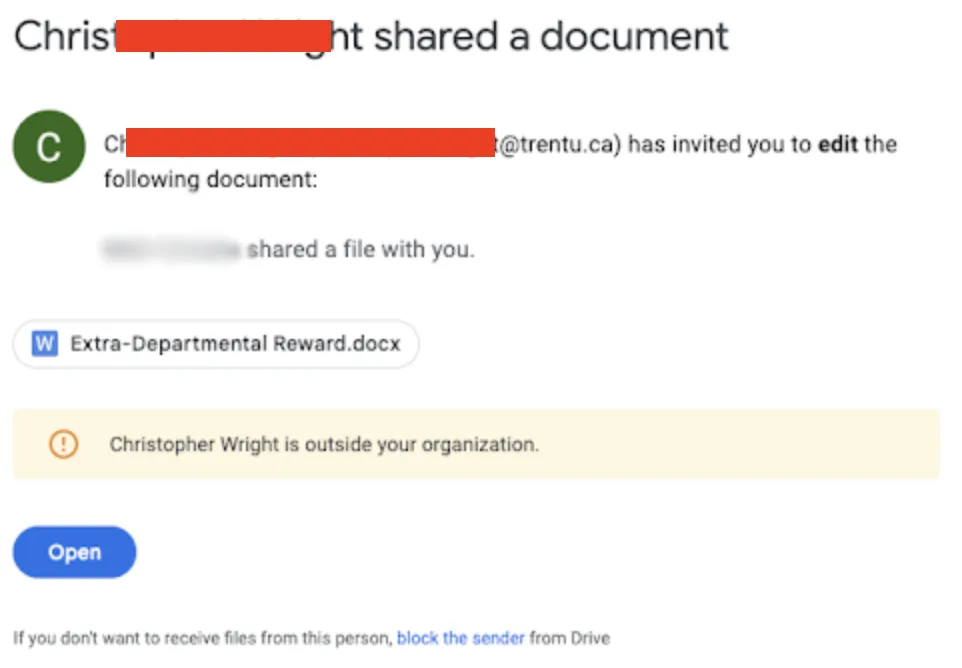
Phishing emails are the most common way ransomware infiltrates systems, often designed to look like legitimate communications from trusted entities. These deceptive messages manipulate individuals into revealing sensitive information or downloading malicious software, leading to significant data breaches and financial losses. (Source: malwarebytes.com)
Sometimes the email has an attachment instead. This could be a fake invoice, a “shipping notification,” or a resume. Opening it often runs malicious code, called a payload, on your computer. This payload then downloads and installs ransomware. You won’t even know it’s happening. It’s an invisible infection.
Spear phishing is a more targeted version. Attackers research specific victims. They know your name, your job, or recent company news, making their emails incredibly believable. This also makes them much harder to spot. A finance employee, for instance, might get a fake invoice from a vendor they know.
Unsecured doors: using vulnerabilities and weak RDP
Attackers also use known weaknesses in software and systems. These vulnerabilities act like cracks in your digital walls. Groups like the Cybersecurity and Infrastructure Security Agency (CISA) regularly warn about such flaws. Ignoring these warnings leaves your systems open.
The Remote Desktop Protocol (RDP) is a common target. RDP lets users connect to a computer remotely, as if sitting right in front of it. This feature is very useful for remote work or IT support. However, poorly secured RDP connections are a common entry point for ransomware.
Many organizations leave RDP ports directly open to the internet. Even worse, they often use weak, easy-to-guess passwords. Attackers use automated tools to scan the internet for these open ports. Once they find one, they can use brute-force attacks, trying thousands of common passwords to get access.
Once an attacker gets in via RDP, they control the remote machine. They can disable security software and move through your network. Then they deploy ransomware. This method completely bypasses typical phishing defenses. It’s like finding a back door someone forgot to lock.
Unpatched software creates other weaknesses. Software developers constantly release updates to fix bugs and security holes. If you don’t apply these updates fast, attackers can use publicly known exploits to break in. For instance, the 2017 WannaCry ransomware attack used a flaw in older Microsoft Windows systems. A patch for that flaw had been available for months, and organizations that hadn’t updated became victims.
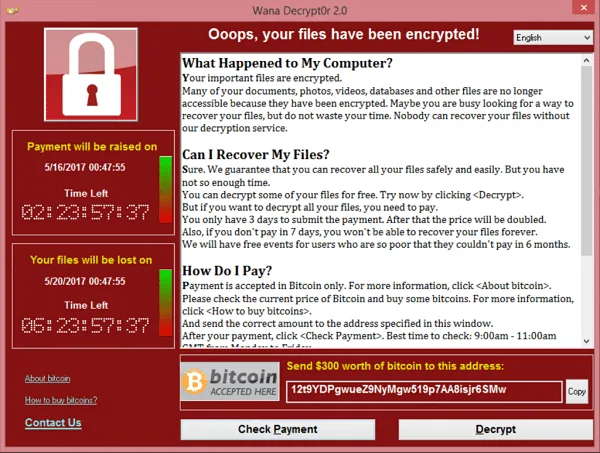
The WannaCry ransomware attack in 2017 exploited a vulnerability in older Microsoft Windows systems, encrypting data and demanding payment in Bitcoin, affecting hundreds of thousands of computers worldwide. (Source: imperva.com)
The supply chain weak link: trusted connections under attack
A supply chain attack uses the trust between an organization and its vendors. Instead of hitting the target directly, criminals compromise a less secure third party. They then use that trusted connection to reach their ultimate victim. The 2020 SolarWinds attack is a major example.
Imagine a poisoned package delivered by a trusted postal service. The postal service is real, but the package it carries is malicious. Organizations depend on many software vendors, IT providers, and cloud services. Each vendor is a possible entry point.
Attackers might compromise a software update server for a real application. They then inject their ransomware into a seemingly official update. When the target company installs this update, they unknowingly install the malware. This method is especially dangerous. It bypasses many typical security checks since the software comes from a trusted source.
Another way involves managed service providers (MSPs). MSPs handle IT for many clients. If an attacker compromises one MSP, they can access all of that MSP’s clients at once. This gives ransomware gangs a large multiplier effect. In 2019, attackers compromised several MSPs. This led to ransomware attacks on hundreds of their client businesses, as reported by security firm Sophos.
Catching a ride: malvertising and drive-by downloads
Sometimes, you don’t even click a link or open an attachment to get infected. Malvertising and drive-by downloads can infect your system just by visiting a malicious website. This is a passive yet very effective attack. Think of it like picking up a hidden bug from a public bench.
Malvertising injects malicious code into real online ads. These ads can show up on reputable websites, even major news sites. When your browser loads the ad, the malicious code runs. It often sends you to a malicious site. Or it directly tries to use weaknesses in your browser or its plugins.
This technique doesn’t require you to do anything beyond visiting the page. The attack happens silently in the background. It uses the complex world of online ad networks, making it hard for users to spot. The ad network itself might be legitimate, but an attacker can slip their malicious ad into the rotation.

SolarWinds, a major IT management software company, became infamous after a 2020 supply chain attack compromised its Orion platform, allowing attackers to infiltrate thousands of government agencies and private companies globally. (Source: reuters.com)
A drive-by download happens when you unknowingly download malicious software. This occurs just by visiting a website. It often uses flaws in your web browser, its plugins (like Flash or Java), or your operating system. If your software isn’t updated, a malicious website can quietly install ransomware.
These attacks often use exploit kits. An exploit kit is software that automatically scans your system for known weaknesses. If it finds one, it uses the right exploit to install malware, including ransomware. Criminals often sell these kits on dark web forums, making advanced attacks available to more people.
Defending your digital castle: preventative steps
Defending against ransomware requires multiple layers of protection. Both organizations and individuals must take preventative steps. The Australian Cyber Security Centre (ACSC) always highlights backing up data and using strong authentication. These are fundamental to good cyber hygiene.
First, back up your data regularly. Store these backups offline or on a separate network. This ensures you can restore your files without paying a ransom if an attack occurs. Think of it like having spare keys and a separate safe for your valuables.
Second, use multi-factor authentication (MFA) everywhere possible. MFA asks for a second verification beyond a password, such as a code from your phone. This makes it much harder for attackers to use stolen credentials, even if they get your password.
Third, keep all software and operating systems updated. Patches fix known weaknesses that attackers often use. Automate updates if possible. This closes those “unsecured doors” before criminals ever walk through them.
Fourth, teach yourself and your employees about phishing. Regular training helps spot suspicious emails and attachments. People are often your first line of defense. Organizations should run fake phishing attacks to test preparedness and increase awareness.
Finally, segment your network and limit RDP exposure. Do not leave RDP ports open to the internet. Use a Virtual Private Network (VPN) for remote access. Always use strong, unique passwords for every account. These steps make it much harder for attackers to move through your system, even if they gain initial access.

Exploit kits, software designed to automatically find and exploit vulnerabilities to install malware like ransomware, are frequently traded on dark web forums. These hidden online marketplaces allow criminals to purchase sophisticated tools, lowering the barrier to entry for advanced cyberattacks. (AI-generated illustration)
Frequently asked questions
What’s the first step if hit by ransomware? Immediately disconnect the infected computer or network segment from the internet. This stops the ransomware from spreading or encrypting more files. Contact law enforcement, such as the FBI. Also, consider calling professional incident response services.
Should I pay the ransom? The FBI and CISA advise against paying ransoms. While it might seem like the fastest fix, paying does not guarantee file recovery. It also encourages more attacks. Plus, it funds criminal groups, making the problem worse for everyone.
How can small businesses protect themselves? Small businesses should focus on regular data backups. They need to use MFA and train employees on cybersecurity. They should also use effective endpoint detection and response (EDR) solutions. Make sure all software is updated regularly. These basic steps offer strong protection.
Are individuals at risk too? Absolutely. Attackers often target individuals with phishing emails or malicious websites. Protect your personal devices with antivirus software. Use strong, unique passwords. Be careful about what you click or download. Your personal photos and documents are valuable, which makes them targets.

The FBI advises against paying ransomware, instead urging victims to report attacks to their dedicated cyber divisions. The agency actively investigates cybercrime and works to disrupt ransomware operations globally. (AI-generated illustration)
You might also like:
👉 WannaCry 2017: The Cyberattack That Crippled UK Hospitals